Monday, 23 January 2012

Evaluation: Question 3

Q3: How did you use media technologies in the construction and research, planning and evaluation stages?


Here is a list of the technologies I used 
  • Cameras - These were the most important and also most expensive equipment we used, as without them we would not have been able to film anything. We only used the cameras in the production stage and filmed in 720p HD. I found the cameras easy to use as we used them in the AS year to film our thriller openings. This year I experimented with different angles and camera movements, such as moving the camera in time with the music. Also, more experimental editing prompted me to film some different kinds of shots, such as long shots of a character running, which would then be sped up/slowed down. When filming at night, we tried filming in different levels of light as we had portable spotlights with us. Filming in low light while still making sure there was enough light to be seen was quite difficult, but I think we got this right as it looked perfect on the computer & at the cinema screening.
  • Still Camera - We used still cameras to take pictures of many different things during the planning and production stages. Firstly, we took pictures of our storyboard and then used this to take pictures of little figurines to create our animatic. Click here to see our Animatic
  • Flip Cameras - I used these small handheld cameras several times throughout the year to record things quickly and easily, such as feedback from teachers and classmates.
  • Memory Cards - The 16GB memory cards we used allowed us to film hours of footage (until the camera batteries ran out)
  • External Hard Drive - We used a 500GB external HD to store all of our work. This was important as we did not always work on the same computer every lesson. It also meant that our work was safe, and no one could interfere with it. The 500GB capacity meant we could store lots of footage on the HD and not worry about deleting any we didn’t need.
  • Apple iMacs/Mac Pros - We used dual screen Mac Pros for most of the editing, as the two screens made it easy to see the different windows of Final Cut Pro easily. After the music video was finished, we used the iMacs for creating the ancillary work on Photoshop. Both types of Mac had the same software installed, but editing was easier on the Mac Pros with two screens, and using Photoshop on the iMacs was more practical and compact.
Our finished music video in Final Cut on a dual screen Mac Pro
Software:
  • Final Cut Pro - This was the most important software we used, as it allowed us to edit the footage we filmed and create the music video. Without Final Cut or a similar editing software package, we would have just had lots of separate clips. I did almost all of the editing for my group, and experimented with effects such as slowing down clips.
Here is a video of myself using Final Cut to show how we created the 'flickering' effect between the two clips, and how I changed the speed of some of the clips to convert them to slow motion.


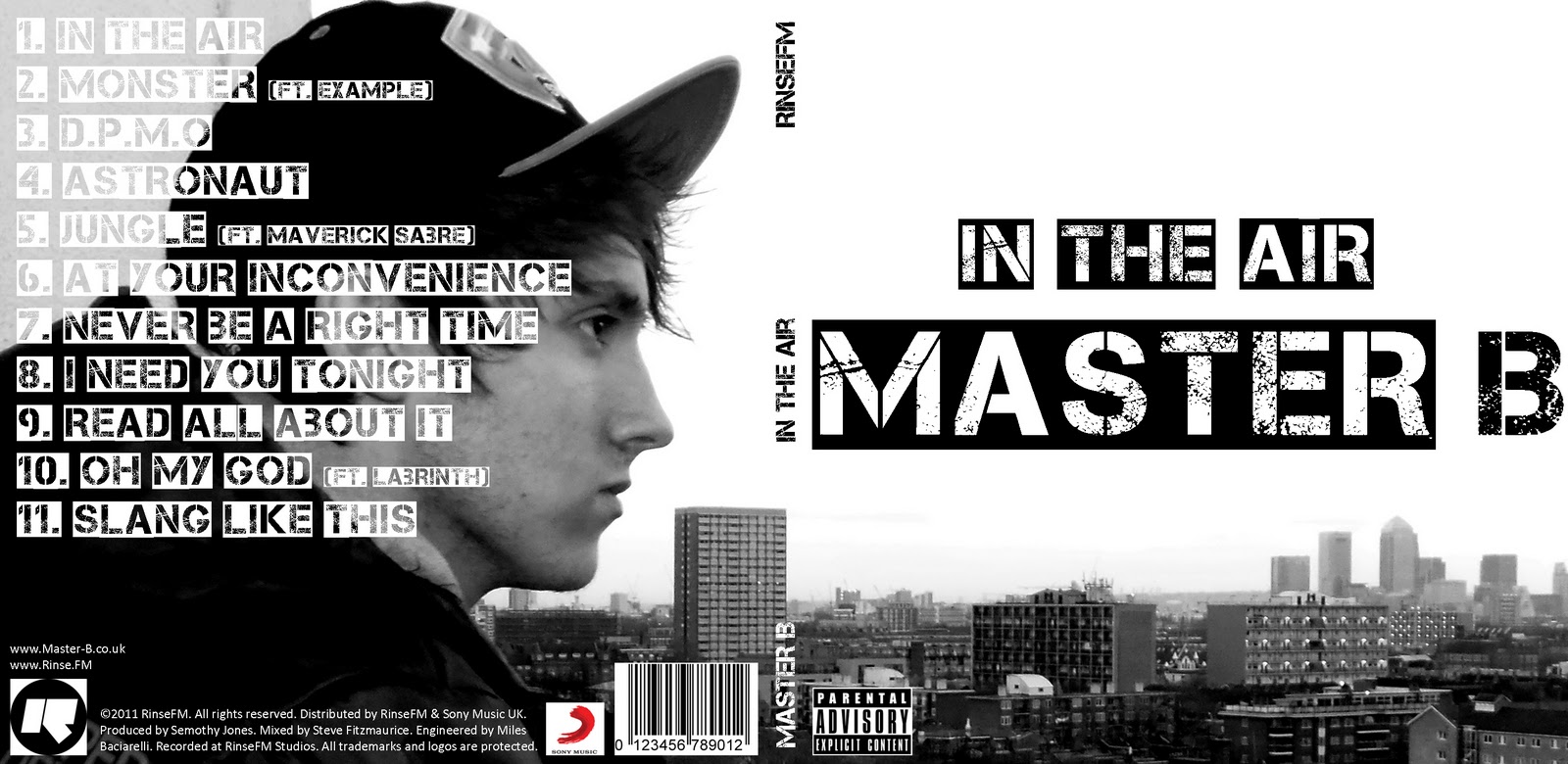
  • Photoshop - Photoshop was only used for the production of the ancillary products. I used it to manipulate an image of the artist and add text and logos. My digipack was quite a simple design, which the video below shows, in which I hide all the layers one by one so every element of the design can be seen.


  • Handbrake - Handbrake is what we used to convert video files (.mov) that had been exported from Final Cut Pro to smaller file sized .mp4 files so we could upload them to Blogger. The downside to this is the quality is significantly reduced, but on the plus side the upload time is short.
  • Fontbook - I used Fontbook to install fonts that I downloaded from the website Dafont.com so I could use them in my ancillary work.
  • iShowU - This is a screen recording program which I used to create the two videos seen above. It records everything that happens on screen and exports it as a video file. I have found it very useful in the evaluation stage to illustrate certain things that I have done on the computer.
  • Powerpoint - We used Powerpoint to create our pitch before delivering it to our teacher and the class. It is very easy to use, and enabled us to add text and images to different slides in the presentation.

Websites:
  • Blogger - Blogger is the most important website and has been used in every single stage of the process. It enabled us to document/record our research, planning, production and evaluation in a way which is easy to access and use.
  • Youtube - I used Youtube extensively in the planning and research stage to watch music videos and find examples of shots and editing techniques that I could use in our music video. It was very important and helped a lot, as their are thousands of music videos on there which can be viewed any time.
  • Vimeo - Vimeo is the site we used to view previous student work in the planning stage, and also upload our music video to at the end of the production stage.
  • Prezi - This site is useful for creating online slideshow presentations which can be embedded into other sites (such as Blogger)
  • Dafont - This website has thousands of free fonts which can be downloaded quickly and easily. This was vital for my ancillary work, as the most important feature of the front of my digipack is the title font. Luckily I was able to find a suitable font on this website.
  • QRcodeGenerator - I used this website to create a QR code image which could be scanned with any smart phone and would then link to the artist’s website for my advertisement. 


The font I used from the website Dafont.com


Evaluation - Question 4

What have you learned from your audience feedback?


Evaluation - Question 3

How did you use media technologies in the construction and research, planing and evaluation stages?


To make our music video, we had to research, plan, make and evaluate .To do this i used various media technologies.


For the research i mostly used the internet, I went on websites like youtube.Youtube was the main website i used to watch music videos, there are many videos which made it easier to get ideas for our music video. We saw good and bad videos to make sure our video was done properly.


We used blogger to blog about everything we done, if we watched a video on youtube we would blog about it and how it helps with our music video. If we would have some ideas for our video by blogging about it, it helped us to remember so then we could use it. It was a step by step blog so everyone else can know how we created our video and what inspired us to do it the way we did. I am also using blogger now to write up my evaluation and bringing everything together.
I used different multimedia to make my blog interesting. I included videos, images  so it would all be visible and for me to remember what i have done and how i did it.


We used final cut pro to plan our video as well as editing it.
We created an animatic when we were planning our music video so we had a idea of what we wanted it to look like. We used pictures from google to create the background then used dolls as if they were the artist in our video.
Here is the animatic we created using Final Cut Pro:  http://candipop11group25.blogspot.com/2011/10/animatic-of-our-music-video.html

 For editing our music video,  Final Cut Pro was the programme that we used. This helped us create the best       music video. Our video needed a lot of edits to be the best it could be.  
The track was added first then the shots from the music video and we were able to put them anywhere we wanted and see where it worked.


Dafont website 
I used photoshop to construct my advertisement and digipak. Photoshop helped me to create my ancillary products in a way that it would be recognizable to people and linked to the music video. It enabled me to use pictures of the artist combined with other things such as text. There were various fonts we could use but i chose to                          use a font from another website http://www.dafont.com/, and then downloaded it into photoshop.

These are my ancillary products made on photoshop:


Finally the most important technology used to make the music video was brand new state of the art video cameras. The camera was great for filming, we had memory cards to save all of the shots we filmed to then putting them together on final cut pro.


Question 2

How effective is the combination of your main product (video) and ancillary texts ( digipak and advertisement) ? 


My ancillary products have a lot of visual links between it and the music video. Both the digipak and the advertisement have pictures of the artist from the music video.


Advertisement


The advertisement has the name of the artist and the name of the album in bold writing which is visible to the audience. The picture of the artist is of him sitting in an estate which most of the video was filmed at. He is also wearing the same style of clothes as he was in the music video. This all makes it recognizable to the audience.


 Inside panels
Front And Back 


My digipak also has the name of the artist and the name of the album quite visible to the audience.        
It has the same font as the advertisement. The picture of the artist is the same as the advertisement picture which the audience will recognize.   


A2 Media Studies-Evaluation Question 4

Questions


4) What have you learned from your audience feedback?
Pardon the error its A2 Music video


Mary (Media teacher) reviewed our work after watching it at the cinema and enjoyed, she gave us positive feedback and had nothing particularly negative to say about the Music video.
I asked her

"What was the most favourite aspect of our video?"

In Mary's words The strong aspects of our video where;

  • The crossed cutting between me (Hooded black male)and Masta B (consistant)
  • The performer and narrative
  • The tempo of the song went up the editing went up
  • Really liked the pace
  • Liked the jump cuts Brilliant sense of camera movement
  • Massive sense of style
  • Loved the colour
  • The perspective, the location shots at the barbican
  • The strong lighting in the dark


I interviewed Jourdaine after the viewing of our A2 music videos. 
I asked her:
"What section of our music video did you particularly like the most"

These where her answers;
  • Liked the narrative
  • The ending was very good


After watching my music video I stopped jessica and asked her for opinion on our music video this is all the positive feedback she gave;
  • The beginning
  • The ending
  • The beginning worked well with promoting the artist
  • Masta B (Bens) Lip syncing  was really good
  • The ending emphasised the paranoia 
  • The mystery of the ending not knowing what happened to me (The hooded male)
  • The cross cutting between me and the artist


I interviewed Lorenzo after viewing my A2 media Music video and these are the highlights of his comments
Out if the scenes which ones did you find the most effective or impressive?
  • The editing when the tension was built up
How could/would you change your product in relation to this feedback?

Wordle: Untitled

I could improve several aspects of the music video some suggestions where
  1. Add additional base tracks
  2. More locations
  3. Clarify the Narrative
  4. Show who was chasing me
  5. More scenery shots

This is the Video (Below) of the reaction that the my media peers in my year showed when watching my A2 Media Music video production.


My group got a loud applause from the audience before my video began, Im hoping that this was from the framing of the camera of me walking, in addition with just thorough support.


I got a loud applause at the end of my music video as you can see, i think this was particularly due to the fact that as the second verse began the intensity of the Music video increased. The variety of editing increased, the amount of shots, the match cuts, cross cuts from me (paranoid black male) and Masta B increased and the style of the video; in terms of night settings and mise en scene stayed consistant.

My comments on the feedback
    1. I really appreciate the feedback given by various students on a whole they where very much positive, especially hearing the spectacular response from Mary a media teacher about our video. I appreciate the comments about our editing, me and Ben focused on this aspect the most as it was important in our piece to try and perfect it. We where trying to display paranoia and fear so quick paced editing was necessary. The jump cuts from the performer and narrator was noticed from most of those interview i believe this was kept consistant throughout the music vid  and worked well in displaying a story.
    2. Jessica and Lorenzo shared contradictory statements about whether we should have showed the subject who was chasing the narrative performer (me), this was the view from Jessica and some others. However Lorenzo felt the fact this wasn't displayed added to the mystery and tension throughout the music piece as it kept the audience questioning until the very end.

Quick Slide Show On The Cinema Viewing Experience

View more presentations from Jaysmally.

Thursday, 19 January 2012

Evaluation: Question 2

Q2: How effective is the combination of your main product (music video) and ancillary texts (digipack and advertisement)?

Here is a video of me addressing question two:


This image is the main image used on my digipack and advertisement. The costume/outfit makes it easy to see that it is the same person/artist as in the music video. Also the background shows an urban area, which is the same setting as most of the video.


This is the image which I used in the inside of my digipack, which looks similar to some of the scenes in the music video. 


The front of my digipack


My advertisement
I think my advertisement is eye catching and will appeal to my target audience. Also it is clear what genre of music the advert is showing just by looking at it, due to the font, colour scheme and images used. I used a greyscale effect on the images on the digipack and advertisement to make it seem darker and bleak, and look more like the music video as part of it was filmed at night, and the whole thing has a dark/grimey feel to it, which captures the feel of the track. 


The inside of my digipack
These are some screenshots from my music video showing the urban/concrete background, which creates the same feel/atmosphere as which is captured by my ancillary products.