Showing posts with label Sebastian Fina. Show all posts
Showing posts with label Sebastian Fina. Show all posts
Thursday, 19 January 2012

Evaluation - Question 3
How did you use media technologies in the construction and research, planning and evaluation stages?
Internet and Software

Internet and Software
 |
| Blogger logo |
For research, we used blogger to upload all our work and keep it in a blog format. If we saw a video on youtube that we were influenced by, we'd put it on the blog. When we finished our planning such as storyboard and animatic, we placed it on the blog. The blog was basically our stockpile area for work to show our progress.

I also used Youtube to find videos for researching and planning our music video. We found influences by other grime artists for our music video and also other videos that had effects we wanted to use as well in our music video.
 |
| Photoshop Elements |
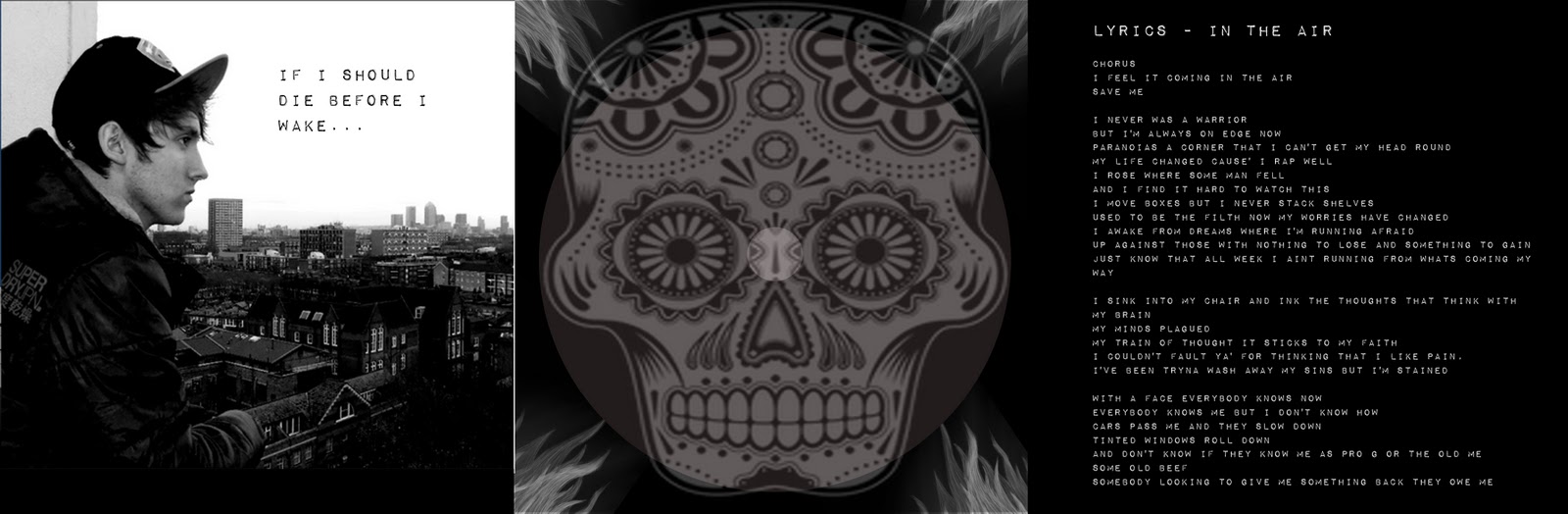
Using photoshop elements, I was able to create my digipak using templates provided on the system. I created this 3 panel digipak plus an advertisement using the software. It allowed me to use an image I created of a sugar skull which we used as the motif of our music video, I used it on the front cover of my digipak.
Final Cut Pro is the software we used to edit our music video. It consists of a timeline in which you place the clips onto the timeline and you're able to cut and move the clips into position.
Vimeo: A media site like Youtube. We placed our music video on there for everyone to see.
Dafont: A website filled with different fonts to choose from. I used this website for my ancillary products.
QRcodeGenerator: Square pixeled bar codes which are scannable using a smart phone. I placed a QR code on my digipak for an exclusive fansite for my artist.
Technology:
Cameras - Used to film the music video. We used expensive JVC HD cameras which gave us good resolution and a good diverse use of the camera like zooming in and out without the video going pixelated.
Still Camera - Used to take still images
Flip Cameras - Small handheld cameras used to record short clips. I used the flip cameras to record short explanations of my work.
Memory Cards - Used to film the music video.
External Hard Drive - We used a 500GB external HD to store all of our work
 |
| Final Cut Pro |
Final Cut Pro is the software we used to edit our music video. It consists of a timeline in which you place the clips onto the timeline and you're able to cut and move the clips into position.
Vimeo: A media site like Youtube. We placed our music video on there for everyone to see.
Dafont: A website filled with different fonts to choose from. I used this website for my ancillary products.
QRcodeGenerator: Square pixeled bar codes which are scannable using a smart phone. I placed a QR code on my digipak for an exclusive fansite for my artist.
Technology:
Cameras - Used to film the music video. We used expensive JVC HD cameras which gave us good resolution and a good diverse use of the camera like zooming in and out without the video going pixelated.
Still Camera - Used to take still images
Flip Cameras - Small handheld cameras used to record short clips. I used the flip cameras to record short explanations of my work.
Memory Cards - Used to film the music video.
External Hard Drive - We used a 500GB external HD to store all of our work
Thursday, 12 January 2012
The Evaluation Question 1 & 2
 |
| The motif |
For the music video, we stuck to traditional conventions of a music video such as promoting the artist with more screen time and close up shots of the artist. We also used a motif in our music video which was a small sticker We were influenced to create a video with the subject of paranoia just like the original music video, as it also entwines well with the lyrics which are about a manifesting paranoia from becoming famous. However we decided to add our artist in the actual music video unlike the original for the song where it's just a storyline character. Our music video transitions from storyline to performance shots of our artists.
For my ancillary work, I used specific factors to help me keep my product conventional and make it look part of the grime genre that our song is derived from. For example, here is my advertisement. The colour scheme is dark and only consisting of the three colours: black, grey and white. This reinforces the stereotype of grime. I used the picture of the artist shown below because it also adds the grime feel to the advert due to the back ground showing housing and council flats. I decided to use the motif itself as my digipak cover as it links with the music video too, so I incorporated it into my advert too so fans would recognise the sugar skull icon in shops and be able to purchase the artist's cd.
 |
| Front panels |
My digipak is a 3 panel. I've decided to use some modern technology and incorporated QR codes in my digipak. The QR code on my digipak will let the artist's audience use their smart phones to visit the website and become an exclusive fan of the artist.
 |
| Inside panels |
 |
| My advert |
Monday, 9 January 2012
Finished digi-pak plus feedback
 |
| My Advertisement |
 |
| Inside panels |
 |
| Outside panels |
I obtained feedback from Julian, here are his likes and dislikes:
Likes:
- The saturated colour scheme
- The artist's picture and how he's promoted
- the picture showing urban areas which exemplifies the genre of grime
- the itunes logo.
Dislikes:
- In the air needs to be in capitals
- Remove the itunes 'click here'
- Put the magazine ratings in a list
- Move the rinseFM logo to the bottom
Digi-pack cover skull logo mock up
Here are a few pictures of me drawing the sugar skull for my digipak cover and it's progression to the finished product:


Thursday, 15 December 2011
Digipak completed w/ Advert- pictures of photoshopping

These are the front 3 panels of my digipak. The far right is the front cover, with the iconic skull used as our motif as well in our music video. The back cover in the middle with record label and songs. And a unique exclusive fan club link with a QR code for those who wish to get onto the Master B website.

These are the inside panels of my digipak. On the far right are the lyrics to the song we did the music video to. In the middle is the CD casing, the background has a skull on the back. And on the far left is a picture of the artist with a small part of the lyrics from the song.

This is my advert, it includes reviews from Grime music mags and other music magazines along with a competition at the bottom to see the artist live.
Monday, 12 December 2011
Digipak mock ups
Here are my mock ups:

This is my advert, The font used is a variant of the standard font I'll be using for the rest of my digipack.
 These are the inside panels of my digipak. the same picture used for my advert. The cd casing will have tentacles in the corners and so will the front panels below. The front panel cover will have a skull with the font shown ('In the air') and so will the songs on the back panel.


This is my advert, The font used is a variant of the standard font I'll be using for the rest of my digipack.


Thursday, 1 December 2011


Monday, 28 November 2011
Friday, 25 November 2011
Some of the final edits we made before completion
This is the second verse of our music video as you can see there a a range of edits and base tracks which where placed on the final cut programme. This is the area which had to be tidied up the most as edits where not in lined perfctly which made shots pop up when they weren't supposes to. Inaccuracies had to be dealt with and we finally were enable to complete this problem.

We used hand held camera footage shots of me in the video, we did various amounts of match catch shots of me walking and running in this close up camera frame as we believed it would display my emotions better to the audience.

Below is the screenshot on Fianl cut of the shots which are placed with markers which orders the programme to switch from one footage to the other as a result of of timing it in a four beat.

We cut of the duration of time when I was walking (Julien) in the second verse because the footage was of me walking in a mildly slow pace and that didn't correlate with the pace of the beat we made these slower.

Below is how the edit of the scene above and Ben cut this scene and made it shorter.

When Rebecca gave us feedback she stated the ending of the second verse of our song should have fast paced footage so suit the beat. Just like the scene of me walking we would include match cuts from Ben to me then back to Ben and finally of me completing ma run on the long tunnel in the building.

Unfortunately we didn't get a final screen shot of the ending nonetheless Rebecca told us to swap the short footages of Ben's performance for better quality footage as he looked small due to him being out of frame in the shots. These where the fast edits at the ending of our music video, Ben worked on this and Julien edited the ending which we changed as the group came to conclusion that it took to long to end when the camera was panning the view of the building scenery.

Digi-Pack Photoshopped, Final Copy W/ explanation

The photoshopping begins with this image. It's our motif which will be used as our front cover for our digi-pack. However, I've decided to undergo a few changes to give it more flare:

I started off by adding the red outlines using the paint bucket, also outlining 'AIR'. It can be quite tedious as clicking to fill some points causes it fill a few pixels instead of the whole outline.
Then I moved onto adding the white flame effects on the side. I used the grass brush option using the brush tool to make it seem like a bonfire on each side. Then using the brush tool again I selected the leaves brush option and places them around the skull.
To finish it off, I added an effect called plastic cover, which causes the image to look more outlined and more bold.
Digi-Pack idea for front cover
As a time-waster, I have decided to start making an idea for my group's digi-pack.
 Here is a shot of my plan, of course my artwork isn't great but it pretty much shows the idea (excluding Ben's hair on the skull)

Student feedback of our (almost finalized) Music video
We had peers from different groups in media to evaluate our music video and point out the positives or negatives of our music video. In addition to this we had a summary of any elements which could be added in to make our video a successful piece.
Elenie Feeback
Samarges Feedback
Friday Deadline Group 25's last thoughts
25/11/11 this is the Friday Deadline in which my group has to complete our editing. Ill be recording whilst ben and Seb contribute their thoughts for our group as a collective.
This is Sebastian Thoughts
This is Bens thoughts
This is Bens thoughts
I like to say that we are very confident with the editing we have done so far and are basically prioritising our efforts on the second verse of our music video as the rest is done to a good standard.
Monday, 21 November 2011
Similarities and differences in filming a music video to a thriller
As explained in my other blog post on skills development. Planning for a music video has similarities from a thriller, you have to plan locations in the pitch and a storyline for the video itself and other things needed to eventually begin filming.
Filming itself was different as it introduced filming takes of the performer miming over the track. Everything had a sense of rhythm as if each clip had the same timing as the music video so it would fit into place when we would be editing it.
Editing was definitely different, we literally sliced the shots into about 10 - 20 clips just from one whole clip. Also there were much more clips involved obviously because there's much more transitions in a music video, especially for a song as ours which has a fast tempo.
Skills development : Overview of approaching planning
Making a music video has it's similarities and differences of making a film, especially in planning.
The beginning of planning the video was pretty much the same as the thriller. We had a pitch of locations we'll shoot at and all the other things needed. However we needed to figure out music video specific things such as performance locations which were different to thriller locations because you'd have a theoretical stage in which the performer would sing on and stay in that position, instead of walking to different locations. The types of shots had their own variants, a tracking shot wasn't completely the same as it would be in the thriller film; we wouldn't be following the performer walking, instead we'd be panning around as he moved in a small area.
I prefer planning a music video over a thriller film as it does give way for more variations of locations and other specific things that you can imagine doing in a music video.
The beginning of planning the video was pretty much the same as the thriller. We had a pitch of locations we'll shoot at and all the other things needed. However we needed to figure out music video specific things such as performance locations which were different to thriller locations because you'd have a theoretical stage in which the performer would sing on and stay in that position, instead of walking to different locations. The types of shots had their own variants, a tracking shot wasn't completely the same as it would be in the thriller film; we wouldn't be following the performer walking, instead we'd be panning around as he moved in a small area.
I prefer planning a music video over a thriller film as it does give way for more variations of locations and other specific things that you can imagine doing in a music video.
Feedback on Rough Cut
We were given feedback after completing our Rough Cut by Rebecca, these are the few points she said:
Our video should start off with the artist in the first shot rather than the character in the storyline.
There are a few shots that need to be changed or cut up such as when Julien is walking to the camera (0:51 in the video).
Another cut up needed is at the pavement shot (1:20) where we should have Ben singing and Julien walking with transition shots.
2 minutes into the video, Ben needs more shots there.
2:37, We need to do 'something' with the shot (apologies for being less specific here).
2:28, Julien should begin running when the beat drops.
And finally change 2:47 - 2:49 because Ben's too small in the frame (he looks like a dwarf).
One of the bigger points is to have a structure with day and night, which we've been trying to do. Simply the video begins in the daytime then moves into the night.
On a lighter note Rebecca states that, "The ending is brilliant."
Thank you for the feedback Rebecca :D
Our video should start off with the artist in the first shot rather than the character in the storyline.
There are a few shots that need to be changed or cut up such as when Julien is walking to the camera (0:51 in the video).
Another cut up needed is at the pavement shot (1:20) where we should have Ben singing and Julien walking with transition shots.
2 minutes into the video, Ben needs more shots there.
2:37, We need to do 'something' with the shot (apologies for being less specific here).
2:28, Julien should begin running when the beat drops.
And finally change 2:47 - 2:49 because Ben's too small in the frame (he looks like a dwarf).
One of the bigger points is to have a structure with day and night, which we've been trying to do. Simply the video begins in the daytime then moves into the night.
On a lighter note Rebecca states that, "The ending is brilliant."
Thank you for the feedback Rebecca :D
Subscribe to:
Comments (Atom)